Why just parent doesn't open to your messages
A design choice about where the app takes you first, and why we hide the message preview in your notifications.
Most apps open to the inbox. It's the default for a reason. Unread counts pull people in. Notifications get tapped. Engagement is the metric and the inbox is the engine.
We made a different choice. When you open just parent, the first thing you see is the calendar.
It might sound like a small detail. It isn't. Where an app puts you first is the strongest opinion it has about what matters.
What we learned from people who'd left other apps
We spoke to a lot of co-parents during research, including many who had used the other apps and moved on. One pattern came up over and over.
They would open the app, intending to check the calendar or log an expense, and the first thing on the screen would be a message from the other parent. Sometimes a benign one. Sometimes not. The message didn't have to be hostile to land like one. The act of being routed straight into the inbox, before they'd even put down their coffee, was the thing.
The word that kept coming up was triggered. Not in the loose, internet sense. In the literal sense: heart rate up, shoulders tight, day knocked sideways for the next twenty minutes.
So we changed where the app opens
When you sign into just parent, the home screen is the calendar. You see the schedule, who has the kids, what's coming up this week.
There are two deliberate exceptions. If you tap a notification, the app takes you to whatever the notification was about, including a message. Co-parenting often needs timely engagement, and pretending otherwise would be precious. And if something needs your attention, like a pending item in Our Agreement, the app will surface it instead of routing you to the calendar. Defaults bend for what matters.
The message tab is still always one tap away. The point is that you have to choose to go there. The app doesn't shove you through the door.
We hide the preview in notifications too
This is the second half of the same idea. Most messaging apps, by default, show the first line of an incoming message right on your lock screen. That's the standard pattern across the industry.
For most kinds of messaging, it's fine. For co-parenting messages, it can be the worst possible delivery mechanism. You're at the soccer pickup. You're at work. Your phone buzzes. The first three words of a hostile message are now sitting on your home screen for everyone, including you, to see.
In just parent, the notification tells you a message has arrived. It does not tell you what it says. If you decide you want to read it, tap the notification and you'll be taken straight to the message. The friction is on the glance, not on the engagement. You decide whether this is the moment.
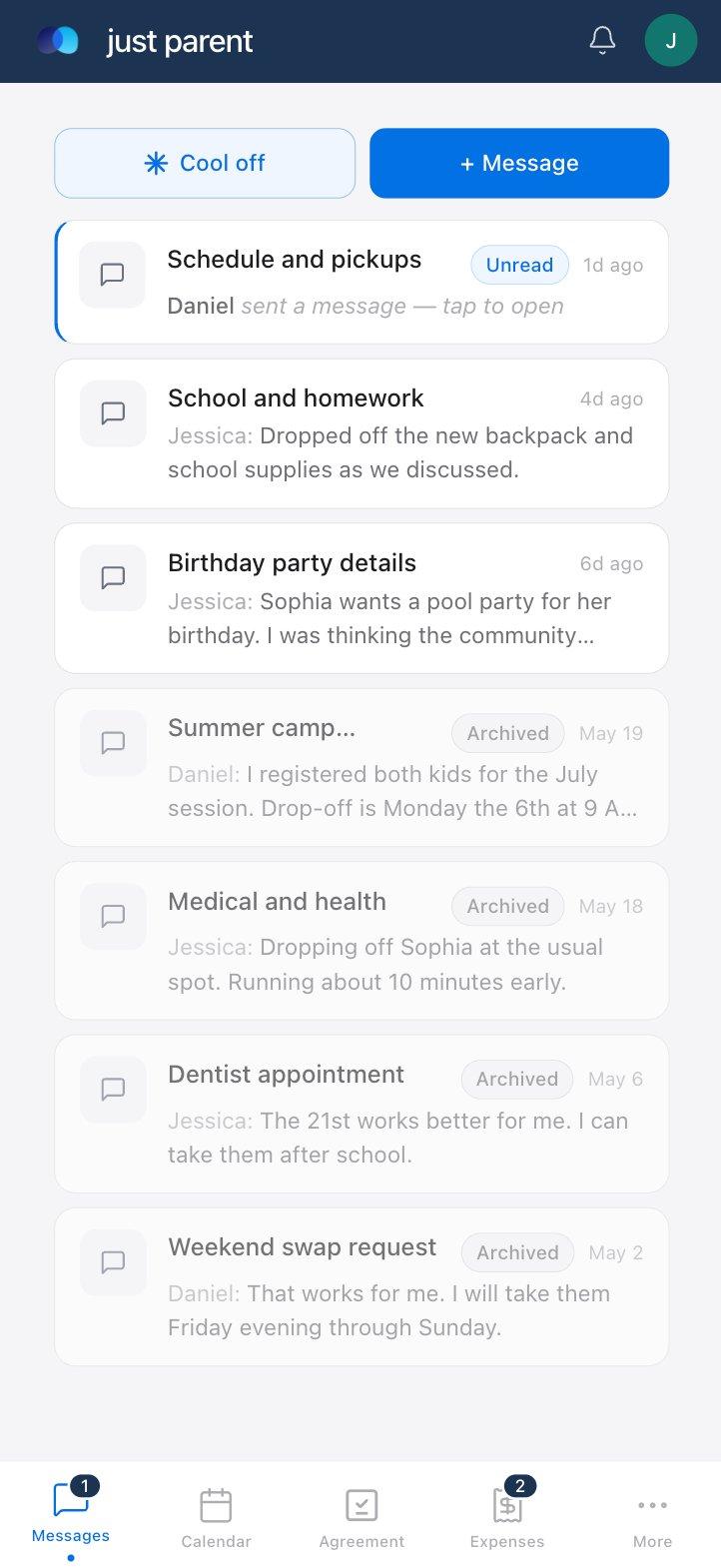
The same principle carries through inside the app. The screenshot below shows the messages list. The unread thread shows the subject and a neutral line: a message has arrived, tap to open. The threads you've already read show their preview content as you'd expect. Until you choose to engage, the app doesn't show you the words.
The bigger system
Hiding the preview is one piece of a larger toolkit. The same idea, that the channel should help and not harm, runs through the rest of the app.
The Calm Assist piece is worth dwelling on, because it's the one that gets misread. It is not a censor. It is not a parent telling you to behave. It is a small pause and a record. The pause is for you. The record is for later, in the event later matters.
We believe both parents benefit from a moment of reflection before a difficult message goes out. We also believe that, when that reflection is declined, the declination should be visible. Co-parenting communication often ends up in front of a third party (a mediator, a parenting coordinator, a judge), and the patterns inside it matter.
- The Cool-Off Button. Free on every plan. Either parent can lock the conversation for 24 hours when things have gotten away from the thread. Both parents are notified. Other functions of the app, like custody change requests, journaling, and shared documents, keep working. We wrote about this one in detail in a separate post.
- AI Draft. On Complete. A writing assistant for the hard message, the kind you've been putting off for three days. It helps you say the thing without making the thing worse. You stay in control of every word.
- Calm Assist. On Complete. As you type, it flags language that reads as heated or elevated. You can edit. You can also choose to send it anyway. If you do, the app asks you to acknowledge the flag, and that acknowledgment is logged. The log is part of the communication record available in a court export.
Design isn't decoration
There's a tendency to talk about design as the layer of polish that goes on at the end. A nice color palette, rounded corners, a clean typeface. Those things matter. They're not the design.
The design is the set of choices about what the app thinks is important. The home screen is the most important real estate the product has. We decided it shouldn't be a place where conflict ambushes you. The lock-screen preview is the most exposed surface the product has. We decided it shouldn't broadcast hostility on your behalf.
Those are design choices. They are not features. They are not on a roadmap. They are decisions we made and then built the rest of the app around.
Who this is actually for
A parent who opens the app, gets ambushed by a hostile message, and has to spend the next hour regulating their own nervous system is a parent who is harder to be around for the kids.
The kids are the real users of this app. They don't have a login. They will never tap a button. But every decision the app makes about how it lands on their parent shapes their afternoon.
What we want from the app
We want the app to be something you can open without bracing for it. We want the notifications to be something your phone can carry without exposing you. We want the conflict to be handled, on your time, in the right tab, when you have the energy for it.
None of that happens by accident. All of it is decided, slide by slide, default by default, in the design.
Every default is a vote for what the app thinks is important.
AI Draft and Calm Assist are on the just parent Complete plan. The home-screen choice, the hidden notification preview, and the Cool-Off Button described above are available on every plan, including free.